Draw over any webpages
The extension lets you draw with a translucent marker to highlight text, add notes, underline content, and create visual accents directly in the browser.
Everything you need to work smarter
A simple tool for drawing and annotating directly on webpages
Drawing mode
Drawing activates while holding Ctrl. The cursor turns into a semi-transparent circle in your marker color with soft edges.
Color palette
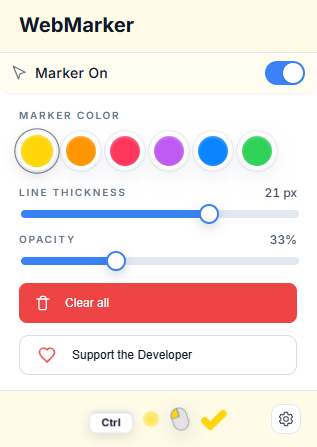
Choose from 6 vibrant colors. Adjust stroke width and opacity in real time with a live preview.
Canvas overlay
Draw on top of the page without changing the DOM. It doesn't block clicks or scrolling and follows the page as you scroll.
Customizable hotkeys
Change the activation hotkey to Ctrl, Alt, or any other key you prefer.
Privacy
All data stays in your browser's localStorage. The extension doesn't collect or transmit information.
Clearing
The "Clear all" button or the Esc key removes every line. Drawings clear automatically when the page refreshes.
Pick any color
A palette of 6 bright shades for every task
Stroke width
Adjust thickness from a thin underline to a wide stroke. The slider updates the preview size in real time.
Transparency
Control the marker intensity. Make it brighter or softer for different highlighting styles. The palette preview updates instantly.
How to use WebMarker
Simple steps to get started
Enable the marker and tune the settings
Open the extension panel to pick a color, adjust stroke width, and change opacity. Every tweak applies instantly with a preview.
Activate drawing mode
Press and hold the Ctrl key (or another hotkey you choose). The cursor turns into a semi-transparent circle in your marker color.
Draw on the page
While holding Ctrl, click the left mouse button and start drawing. Lines stay semi-transparent with soft edges—just like a real marker.
Clear your drawings
Press Esc or use the "Clear all" button in the extension panel to remove every line. Drawings vanish automatically when you refresh the page.
Helpful tips
- •Drawings don't change the page content or block clicks
- •Lines follow the page correctly as you scroll
- •You can change the hotkey in the extension settings
- •All settings save automatically in your browser
Start using WebMarker
A free extension for Chrome and other Chromium browsers
Free forever • No sign-up • No data collection